Why Has My Vacuum Cleaner Lost Suction? 10 Causes and Fixes
Vacuum cleaner lost suction? Don’t give up on it yet. Most of the time something is simply restricting the airflow. It might be a full bin or bag, a clogged filter, something stuck in the hose, or hair wound so tightly around the brush bar that it can barely turn.
The good thing is that these are all quick to check, and you won’t need tools for most of them. Cordless vacuums have a couple of extra things to look at, mainly the power mode and the battery, so we’ve covered those separately.
Before you start, keep your manual close by. Filters, cyclones and floorheads aren’t cleaned the same way on every machine, and what’s fine on one model can damage another. Where your manual and this guide disagree, go with the manual.
Quick answer: what to check first
Switch the vacuum off and unplug it first. If it’s cordless, take the battery out if it’s designed to come out. If not, make sure it’s switched off and keep your hand away from the trigger.
Then start with these four. They’re the quickest checks and they fix a lot of suction problems on their own.
- Empty the bin or change the bag. Do it even if it doesn’t look full.
- Take the filter out and have a look. If it’s grey and caked in dust, clean or replace it the way your manual says.
- Check the power setting. On a cordless model that means the power mode. On a cylinder vacuum, check the power dial and any air vent on the handle.
- Take the floorhead off and feel the suction at the end of the wand. If it’s strong there but weak at the floor, the head is your problem.
Still no better? Use the table below to narrow it down, then work through the 10 causes.
Match the symptom to the likely cause
| What you’re noticing | Most likely cause | See cause |
|---|---|---|
| Suction has faded gradually over weeks | Bin or bag filling up, filter clogging | 1, 2 |
| Suction dropped suddenly, mid-clean | Something stuck in the hose, wand or inlet | 3 |
| Bag is only half full but suction is weak | Bag clogged with fine dust | 1 |
| Strong suction at the wand, weak at the floor | Blocked or tangled floorhead | 4 |
| You can feel suction, but the carpet still looks untouched | Brush bar not spinning | 5 |
| Whistling, hissing or a higher-pitched motor | Blockage or air leak | 3, 6 |
| Cordless model pulses or surges on and off | Blockage or clogged filter | 2, 3 |
| Strong at first, then fades or stops early (cordless) | High power mode or battery | 7, 8 |
| Cuts out after a few minutes and feels warm | Overheating, often from restricted airflow | 9 |
| Everything’s clean and clear but suction is still low | Worn part or internal fault | 10 |
10 reasons your vacuum cleaner has lost suction (and how to fix them)
The first six apply to nearly every vacuum, whether it’s corded, cordless, bagged or bagless. Seven to nine are about power, batteries and heat. Number 10 is where cleaning and maintenance stop helping and you’re looking at a repair.
1. The bin or bag is full
It sounds obvious, but it’s the first thing to rule out. The fuller the bin or bag gets, the harder it is for air to pass through, and suction at the floor drops with it. That’s why most bagless vacuums have a MAX line. Dyson’s advice for its cordless models is to empty the bin as soon as the dirt reaches that line, not when it’s packed solid.
Bags can catch you out. On a bagged vacuum the bag does a lot of the filtering, and very fine dust from sanding or plastering can clog its pores well before it’s full. Miele mentions that its bag indicator can even show “full” in this situation when there’s plenty of room left.
On bagless cyclone models, fine dust also sticks to the shroud or mesh around the cyclone. For the V15 Detect, Dyson says to take the bin off and wipe the cyclone with a microfibre cloth. Water isn’t mentioned for that part, so don’t wash it unless your manual says it’s OK.
What to do: Empty the bin, preferably straight into your outside bin so the dust doesn’t end up back on the carpet. If you’ve got a bagged model, put a new bag in if the old one’s full or you’ve just been vacuuming fine dust. Then make sure the bin clicks properly back into place, or the bag is seated and the cover is shut.
If emptying it makes no difference at all, the bin wasn’t the problem. Move on to the filter. (Bags and bins also behave quite differently as they fill, which we’ve explained in our bagged vs bagless vacuum cleaner guide.)
2. A filter is clogged with dust
Nearly all vacuums have a filter before the motor, and a lot of them have a second one after it. Over time these fill up with fine dust. Less air gets through, the motor has to work harder, and suction slowly drops off. If your vacuum has been getting weaker over a few weeks rather than all at once, the filter is a good bet.
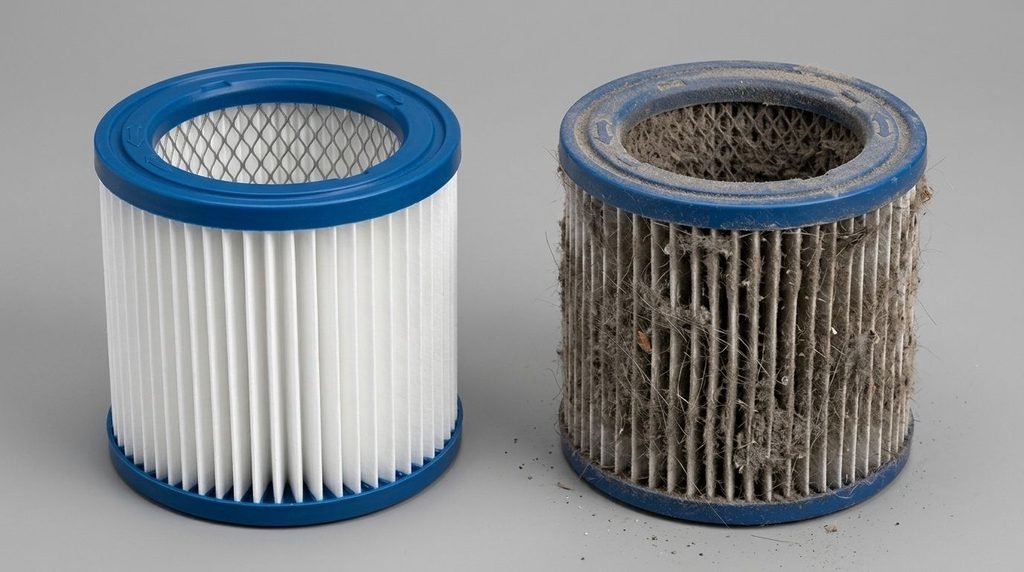
Don’t judge it by the outside. A pleated filter can look fine on top while the folds underneath are packed with dust. Foam filters go stiff and grey so gradually that it’s easy to miss.
What to do: Take each filter out and check it. How you clean it depends on the type:
- Washable filters: rinse them exactly as your manual says. As an example, Dyson’s instructions for its cordless filters are warm tap water and no detergent. You keep rinsing until the water runs clear, then leave the filter to dry for at least 24 hours.
- Non-washable filters: tap the loose dust out outdoors and replace the filter when the manual says to, or sooner if it’s badly clogged or torn.
Keep in mind: A washed filter has to be completely dry before it goes back in. Dyson warns that a damp filter could damage the motor. It also says not to dry filters in a tumble dryer or microwave, or near a naked flame. If waiting a day is a pain, a spare filter means you can keep vacuuming while the other one dries.
3. Something is stuck in the hose, wand or inlet
If suction suddenly drops halfway through cleaning a room, something has almost certainly got stuck. Common culprits are a hair bobble, a sock, a bit of tissue, cotton buds, small toys and big clumps of pet hair. They tend to lodge where the airflow narrows or bends, and at the joins between parts.
You’ll usually hear the change before you find the cause. The motor might sound higher, or you’ll get a whistle. Some cordless vacuums go further and tell you. Dyson’s cordless machines, for instance, are designed to pulse on and off when something is stopping the air getting through.
What to do: With the vacuum off and unplugged, or the battery out, go through it one section at a time:
- Take the floorhead off and look into the neck where it joins the wand.
- Take the wand off and hold it up to a light. If it’s a straight wand, you’ll see a blockage straight away.
- If there’s a hose, check that next. Miele suggests pushing a stuck item out with something long like a broom handle. Be gentle with it so you don’t split the hose.
- Check where the hose or wand joins the main body. On a stick vacuum, that includes the inlet into the bin.
Can’t find anything? The suction test further down shows you which section the blockage is in.
Never reach into any part of the vacuum while it’s on, and with a cordless model watch that you don’t press the trigger by accident while you’re checking. If there’s any chance of broken glass or pins, wear gloves. Don’t dig at a blockage with anything sharp either.
4. The floorhead is blocked or the brush bar is tangled
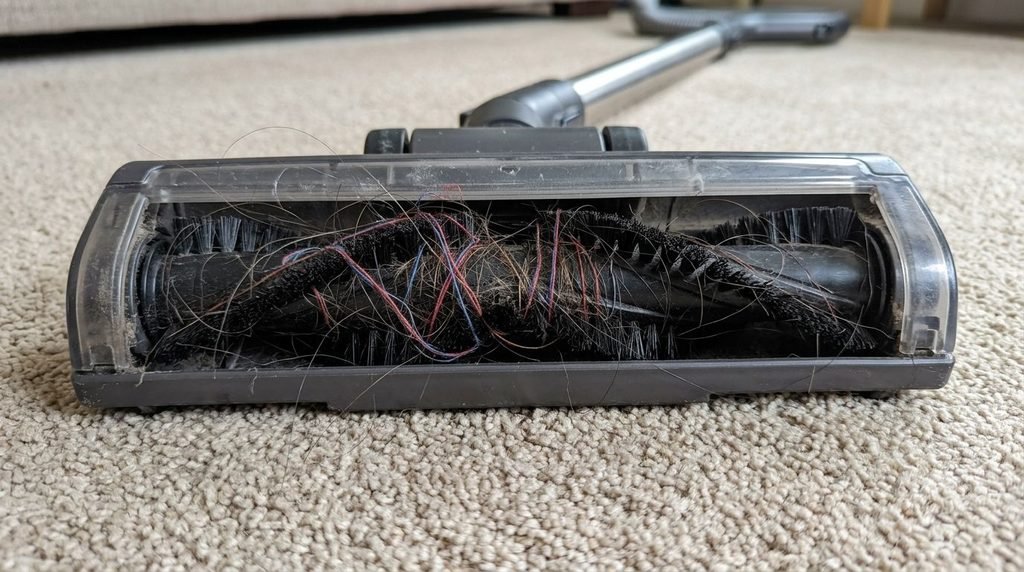
Hair, thread and carpet fibres wrap themselves around the brush bar. At the same time, grit and fluff collect in the air channel under the head. Both reduce how much air and dirt the head can pull in, and with pets or long hair in the house it can happen surprisingly fast.
You can usually tell because the vacuum pulls well through the wand on its own, then struggles as soon as you put the floorhead back on.
What to do: Switch off, unplug or take the battery out, and turn the head upside down. Snip through the wrapped hair with scissors. Plenty of brush bars have a groove running along them for exactly this. Pull the hair away, clear out the air channel, and check the wheels still turn freely.
Only take the brush bar out if your manual shows you how. End caps and clips differ a lot from model to model, and forcing one is an easy way to snap it.
Some floorheads have an indicator light that helps here. On Shark models with one, a solid red light means the brush roll or soft roller is jammed. A flashing red light means the floorhead is overheating and needs to cool down.
Keep in mind: A tangled brush bar is really a pickup problem rather than a suction problem. The motor may be pulling air perfectly well, but if the head can’t brush the carpet properly or sit flat on the floor, it’ll still leave bits behind. If you’re forever cutting hair off yours, an anti-tangle head makes a real difference. We’ve picked out some in our guide to the best cordless vacuum cleaners for pet hair.
5. The brush bar has stopped spinning
This one gets mistaken for lost suction more than anything else. You can feel a strong pull at the hose, yet the carpet looks the same as it did before you started. On carpet the brush bar does a lot of the work. If it isn’t turning, the vacuum won’t pick much up, even though there’s nothing wrong with the suction.
Why it stops depends on the type of head:
- Belt-driven heads, which you’ll find on a lot of uprights, stop when the drive belt snaps, stretches or comes off.
- Motorised heads, common on cordless models, can stop if the head hasn’t clicked fully onto the wand or the contacts are dirty. Some also cut power to the brush after a jam.
- Either type will stop if the brush bar is jammed solid with hair or debris.
What to do: With the power off, clear any jam and check you can turn the brush bar by hand. Push the head firmly onto the wand until it clicks. Some heads reset themselves once the vacuum has been switched off, while others have a reset button, so it’s worth checking the manual. On belt-driven uprights, the belt is often a part you can change yourself. Just make sure you get the right one for your model.
A smell of hot rubber can mean the belt is slipping against a jammed brush bar, so switch off straight away if you notice it. If the brush bar is clear and still won’t spin, the motor inside the head may have gone. At that point you’re looking at a new head or a repair.
6. Air is leaking in through a gap, a loose part or a split hose
A vacuum needs a sealed path all the way from the floorhead to the motor. Any gap along the way gives the air an easier route in, and you lose suction at the floor. It often happens just after you’ve cleaned the machine, when the bin, filter cover or wand hasn’t quite clicked back in.
Hoses are the other weak spot. They bend every time you use them and can crack or split over the years, usually near the ends.
What to do: Refit everything you’ve taken off and check each part locks into place. Look at the rubber seals around the bin and filter covers for cracks or flattened sections. Then switch on, run your hand along the outside of the hose, and listen for a hiss. A split hose or worn seal needs replacing with the right part for your model. Tape will do for a clean or two, but it’s not a proper fix.
7. The vacuum is in a lower power mode or suction setting
Before you take anything apart, check this. Plenty of cordless vacuums have two or three power modes, and dropping down from a high mode can feel exactly like a sudden loss of suction. Some models also have an automatic mode that changes the power to suit the floor or the amount of dust, so suction will rise and fall from room to room. That’s how they’re meant to work.
Corded vacuums can do the same thing. A lot of cylinder vacuums have a power dial, and some have a little sliding vent on the handle for turning suction down on curtains and sofas. If that vent gets knocked open, you’ll notice the difference on the floor straight away. On uprights with an adjustable carpet height, set it too high and the head barely touches the carpet.
What to do: Check the mode, dial, handle vent and height setting, and compare them with what your manual suggests for the floor you’re cleaning.
Running a cordless vacuum on its top setting all the time isn’t the answer, though. It drains the battery much faster, and Dyson says the filter needs washing more often if you mainly use Boost.
8. The battery is low or wearing out (cordless only)
People often blame the battery, but the link with suction isn’t that simple. Depending on the model, a cordless vacuum running low may keep its normal power until it just stops, or it may get weaker towards the end of the charge. An ageing battery mostly shows up as shorter runtime, not weaker suction from the moment you switch on.
A clogged filter or dirty cyclone can make a perfectly good battery look bad too. Dyson’s advice for the V15 Detect, if the battery seems to run down quickly, is to check the power mode, filter and cyclone first. Only after that does it suggest a replacement battery.
What to do: Charge it fully, then try it in its normal mode.
- If suction is fine but it runs out much sooner than it used to, the battery’s probably to blame. Our guide to how long cordless vacuum batteries last goes through what’s normal as they age.
- If suction is still weak on a full charge, it probably isn’t the battery. Go back to the bin, filter, blockage and floorhead checks.
Keep in mind: If you replace the battery, buy the manufacturer’s own or one it approves for your model. Never open up a battery pack. Stop using any battery that’s swollen, damaged or getting unusually hot.
9. The vacuum is overheating or cutting out
Many vacuums have a thermal cut-out that switches the motor off before it gets too hot. Swan describes it as a safety feature to protect the motor and says the overheating is often caused by a blockage. That makes sense, because the air flowing through the machine also helps keep the motor cool. So weak suction and a vacuum that keeps cutting out often have the same cause.
Cordless models can behave a bit differently. Dyson’s cordless vacuums pulse first to warn you about a blockage, then switch off to protect the motor.
What to do: Switch off, unplug and let it cool down completely. If your manual gives a cooling time, stick to it. While you’re waiting, check the filter, bin or bag, hose and floorhead. Then try again.
If it keeps cutting out after you’ve cleared everything, don’t keep restarting it. Something isn’t right, so contact the manufacturer.
10. A part has worn out or there’s an internal fault
Say the bin’s empty, the filters are clean and dry, nothing’s blocked, every part is fitted properly, and suction is still poor. At that point it’s likely to be something routine maintenance can’t fix. Depending on the machine and how old it is, that could be a worn motor, a failing battery, a damaged internal seal or an electrical fault.
What to do: Look up the manufacturer’s troubleshooting advice for your model, then contact them or an authorised repairer. If the vacuum is still under guarantee, do this before anything else, as opening it up yourself could affect your cover.
Please don’t open the motor housing, sealed parts or battery packs yourself. They aren’t designed to be serviced by owners on most household vacuums, and you risk an electric shock or doing more damage.
How to find where the suction is being lost
If you can’t see a blockage, this quick test tells you where to look. It works on most corded and cordless vacuums. Only take off parts your manual says are meant to come off.
Start at the floorhead and work back towards the body. At each stage, switch on and hold the flat of your hand over the open end for a second or two. Keep your fingers out of it. Switch off again before you take the next part off.
| Suction feels strong at | But weak at | The problem is probably in |
|---|---|---|
| The end of the wand | The floorhead | The floorhead or brush bar (causes 4 and 5) |
| The end of the hose | The end of the wand | The wand |
| The inlet on the body | The end of the hose | The hose (a blockage or a split) |
| Nowhere, even at the inlet | Everywhere | The bin or bag, filters, seals or the machine itself (causes 1, 2, 6 and 10) |
If it pulls much harder with the floorhead off, look at the head before you start worrying about the motor.
Why has my cordless vacuum lost suction?
Most of the time, a cordless vacuum losing suction has the same problem a corded one would: the bin, the filter, a blockage or the floorhead. Cordless models just have a few more things that can affect them, because they also rely on power modes, a battery and their electronics.
| Check | Corded | Cordless |
|---|---|---|
| Full bin or bag | Yes | Yes |
| Clogged filters | Yes | Yes |
| Blockages in the hose, wand or inlet | Yes | Yes |
| Blocked floorhead or brush bar | Yes | Yes |
| Power or suction setting | On some models (dial or handle vent) | Yes (power modes) |
| Battery charge and condition | Not applicable | Yes |
| Automatic cut-out or pulsing | Thermal cut-out on many models | Common, behaviour varies by brand |
Check things in this order: airflow first, then the power mode, and the battery last. It’s easy to blame the battery when the real problem is a clogged filter. If you’re still deciding whether cordless suits you, our corded vs cordless vacuum cleaner comparison covers the pros and cons of each.
When to stop troubleshooting
Most suction problems come down to maintenance. But if you notice any of these, stop using the vacuum, unplug it and get it looked at:
- a burning or electrical smell, smoke or sparks
- a damaged cable or plug
- a battery that’s swollen, damaged or very hot
- repeated cutting out, even after you’ve cleared every blockage
- liquid getting into a vacuum that isn’t made for it
Here’s how we’d split the jobs.
Safe to do yourself
- Emptying the bin and changing the bag
- Cleaning or replacing filters as the manual describes
- Clearing blockages from the hose, wand, inlet and floorhead with the power off
- Cutting hair off the brush bar
- Fitting parts you’re meant to replace yourself, such as filters, belts, hoses or click-in batteries, using the right ones for your model
Leave to the manufacturer or a qualified repairer
- Anything inside the motor housing
- Wiring, switches, circuit boards and internal electrical faults
- Opening or repairing battery packs
- Overheating or cutting out that keeps happening with no obvious cause
- Anything still under guarantee
Repair or replace?
Don’t replace a vacuum just because the suction is weak. Filters, bags, belts, hoses and floorheads are all sold as spares, and so are the batteries for many cordless models. Often, swapping one of them is all it takes to get the machine working properly again.
For an internal fault, start with the guarantee. Citizens Advice points out that a guarantee gives you rights on top of your legal ones rather than replacing them. Your legal rights over a fault can last up to six years (five in Scotland). That’s different from parts that just wear out with normal use, like filters.
Out of guarantee, weigh the repair quote against how old the vacuum is and what a new one would cost. If buying new makes more sense, start with our pick of the best cordless vacuum cleaners. If you’re on a tighter budget, we’ve also rounded up the best cordless vacuums under £200 and the best under £300. Can’t decide between the two big names? Our Shark vs Dyson comparison should help.
How to stop your vacuum losing suction again
A few small habits save you a lot of hassle later on. Your manual has the exact intervals for your vacuum, because there’s no schedule that suits every machine.
| Task | When | Worth knowing |
|---|---|---|
| Empty the bin | When it reaches the MAX line, or after each clean | Don’t let it pack down past the line |
| Change the bag | When full or the indicator says so | Change it sooner after vacuuming fine dust |
| Clear hair from the brush bar | Regularly, more often with pets or long hair | Much easier before it wraps tightly |
| Clean or replace filters | As your manual states | Dyson recommends monthly for its cordless models |
| Check hose, seals and wand joints | Whenever you clean the filter | Look for splits, cracks and loose fits |
Pick up bigger bits by hand rather than letting the vacuum swallow them. And keep an ordinary vacuum away from anything wet or damp, because most aren’t built for it and moisture will clog the filter. A wet and dry vacuum cleaner is the right tool for spills.
FAQs
Why has my vacuum suddenly lost suction?
When it happens suddenly, it’s usually a blockage in the hose, wand, inlet or floorhead. If suction has faded slowly over a few weeks, a filling bin or bag or a clogging filter is more likely. Switch off and check each section in turn.
Can a dirty filter cause a vacuum to lose suction?
Yes, and it’s one of the most common reasons. Filters often look cleaner than they really are, which is why Dyson suggests washing the filter on its cordless models once a month even if it doesn’t look dirty. Follow your own manual for how to clean or replace yours.
My vacuum cleaner lost suction after I emptied it. What now?
Then the bin or bag wasn’t the problem. Emptying only helps when it’s full enough to restrict the airflow. Look at the filter next, then check for blockages.
Why is my cordless vacuum losing suction when it’s fully charged?
Then the battery probably isn’t the problem. Check the power mode, then look for blockages in the bin, filter, wand and floorhead. A worn battery usually shows up as shorter runtime rather than weaker suction.
Why is my vacuum not picking up properly when the suction feels fine?
Check the brush bar. A vacuum can have good suction and still leave dirt behind, especially on carpet. That happens if the brush bar is tangled or jammed, or isn’t spinning because of a broken belt or a loose connection.
Can I put my vacuum filter in the washing machine or dishwasher?
Only if your manual says you can, and we’d be surprised if it does. Lots of filters can’t be washed at all. The ones that can usually just need rinsing by hand. Dyson, for one, says no detergent, and not to dry its filters in a tumble dryer or microwave.
Should I replace my vacuum if it has lost suction?
Not until you’ve gone through the checks above. A full bin, a dirty filter and a blockage are the usual causes, and you can fix all of them for little or nothing. It’s worth replacing when there’s an internal fault that isn’t covered by a guarantee, or the repair would cost too much for a machine of that age.
Sources
This guide is based on manufacturer support guidance and UK consumer advice available when it was written. The instructions for your own model always come first.
- Dyson UK: Cordless vacuum filter care
- Dyson UK: V15 Detect support (performance, cyclone, bin and battery)
- Dyson Community: Why a cordless vacuum pulses or switches on and off
- Miele UK: Bag change indicator shows a full bag
- Shark UK: Anti Hair Wrap tips and brush-roll indicator lights
- Swan UK: Why is my vacuum cutting out during use?
- Beko UK: Why does my vacuum cleaner lose suction?
- Citizens Advice: Claim using a warranty or guarantee